Redefine Success
Commands Aren’t Enough.
I used to think a user’s command was the beginning of interaction between human and computer. Now, working with embodied AI, I’m realizing that a command is often the beginning of the interpretation.
I spent a little more than a decade designing screen-based experiences—Acrobat, Outlook and Copilot. Then my work shifted towards embodied AI, a system that perceives, moves, and acts in physical environments. I thought it would be great to write about what I learned during the transition.
The Model I Trusted
Here are two pipelines that I’ve been working with:
Screen-based apps
Embodied AI
Both pipelines are complex — but the complexity stretches with embodied AI. In a screen-based app, the user arrives with intent already formed. The design challenge is helping them act on it efficiently. In embodied AI, on the other hand, user intent isn’t often declared at all. The system must read the situation, infer what’s needed, and decide whether to act — before anything else happens.
Different Scopes of UX Challenge
Is the UX in a productivity app simple? Obviously not. Designing an Outlook meant building a scalable interaction framework for millions of users with various needs — from a power user who wants them to control granular levels to a user who just wants a clear path to send an email.
I designed for the experience after the user had intent and made a decision before commanding the app. User clicks or types in the application. My job is to make the system stay as the user expected then respond as the user wanted.
In embodied AI, the complexity starts earlier — before even intent is declared. The design challenge is not about how information presents in a specified context but it’s how the system reads a situation, infers what someone needs, and whether to act at all.
“Clear That” — Same Word, But Completely Different Problem
In email app, “Clear everything in this folder”
The system knows what everything means. It also understands what clear means too. Whereas, even though user said “clear the table”, the accepting system has to clarify quite a few things:
Which items are to keep, discard, or left untouched?
What does “cleared” mean in this space?
Does the scope of the command include even the chairs?
Is anyone eating at the table? Then?
Is now the right moment to act?
That made me realize the difference was not simply task complexity. It was where the UX challenge starts.
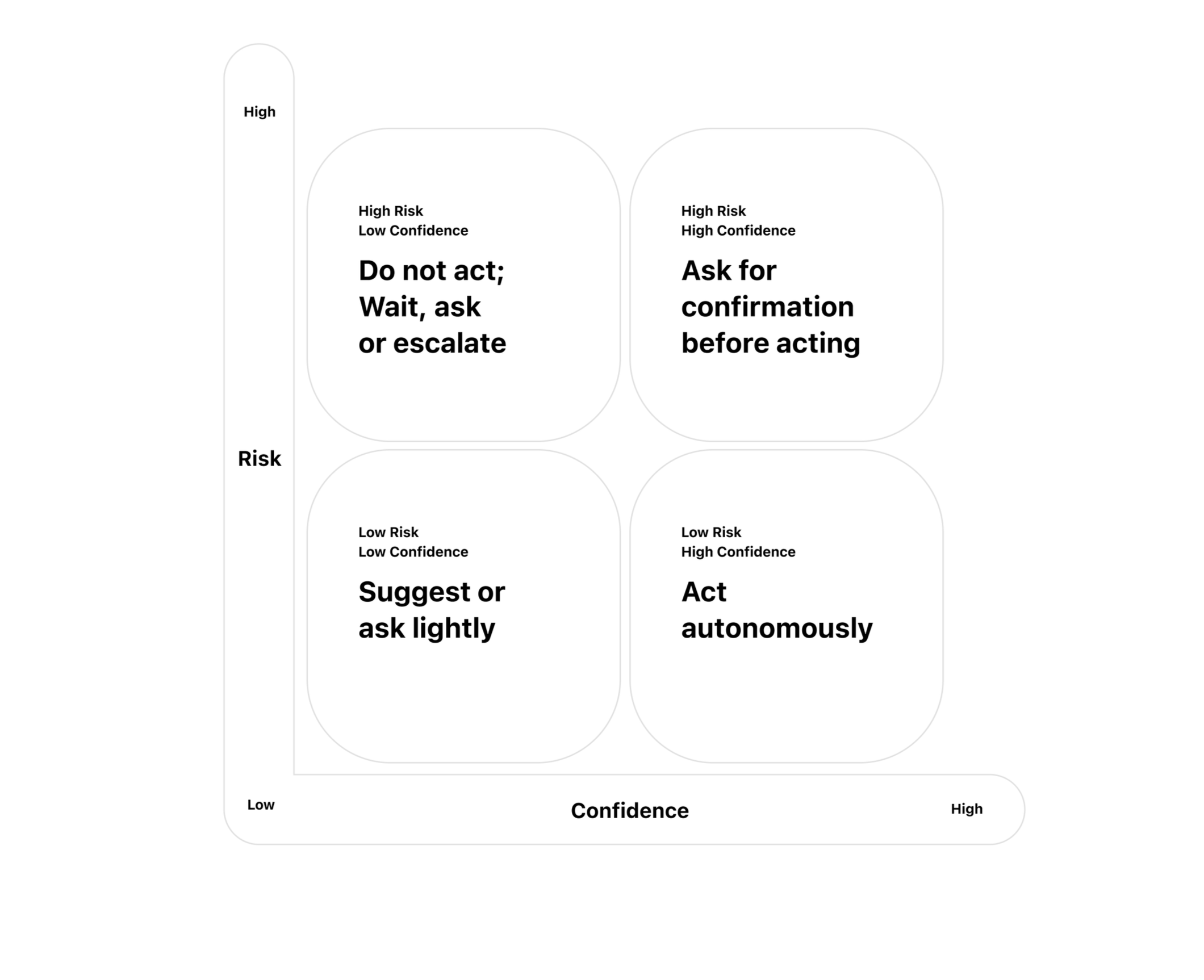
Risk x Confidence for Embodied AI
Things can go wrong. In a productivity app, the failure cost is user facing error, or wrong interface output. In physical space, action changes the world. If it’s wrong, it can come down to a severe result. Something can be damaged and even someone can be hurt.
Confidence-Aware Action Strategy
So, What Is UX Now?
Within the screen, UX is about designing responses — the system shows or provides after user decides with intent. In the physical environment, UX is about designing judgement — the system receives and decides what to show or provide to user.
If commands are not enough, what counts as intent? This is what the next article explores more deeply.